
Knowing exactly how to use a walkie stacker is the difference between safe, efficient handling and costly incidents. This guide walks you through what the machine is, how its controls work, and the step‑by‑step checks you must complete before use. You will also see how to set up aisles, manage batteries, and apply preventive maintenance so the stacker stays reliable. Use it as a practical, engineering-based reference for training, supervision, and daily operation.
What A Walkie Stacker Is And How It Operates
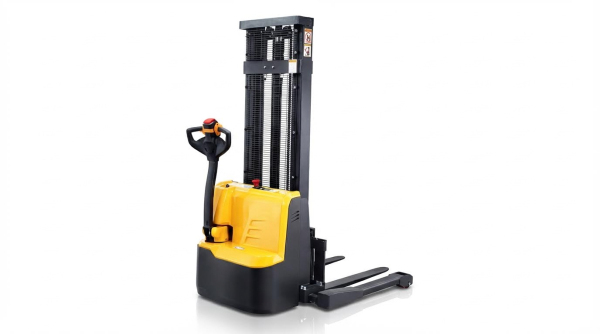
Key components and control layout
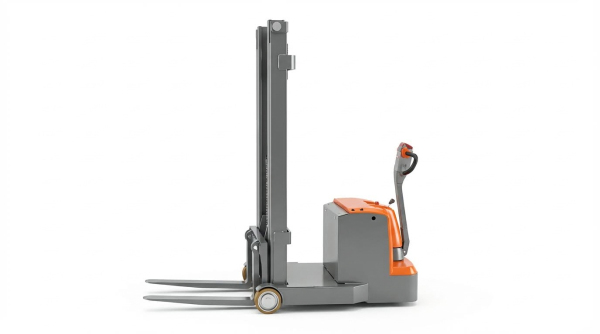
To understand how to use a walkie stacker safely, you first need a clear picture of its main components and where the controls sit. The table below maps the core parts to their function and typical operator actions.
| Component / Control | Location | Main function | Operator use in normal work |
|---|---|---|---|
| Drive / power unit | Front of truck, under cover | Houses traction motor, controller, battery, and drive wheel | Provides motive power and steering response when you move the handle |
| Mast | Vertical structure ahead of power unit | Guides carriage and forks during lifting | Raises and lowers loads within rated capacity shown on the nameplate and must not be overloaded |
| Forks | At the base of the mast | Support and carry pallets or loads | Fully insert under pallet; keep load centered and as far back toward the fork heel as possible for stability to reduce tip risk |
| Load backrest | On carriage, behind forks | Stops load from falling back toward operator | Check it is secure and undamaged during pre-use checks before operation |
| Steering / control handle (tiller) | At operator end | Provides steering, travel, and brake control | Push or pull to steer; move up/down for braking and “deadman” function so the truck stops when released in normal use |
| Travel control (throttle / direction rocker) | On control handle | Sets direction and speed | Thumb-operated; forward/reverse travel at safe walking pace, never faster than you can stop on foot especially in tight aisles |
| Lift / lower buttons | On control handle or nearby panel | Control hydraulic lifting circuit | Raise load just high enough to clear floor (a few inches) to keep center of gravity low during travel and improve stability |
| Horn / warning button | On control handle | Audible warning to others | Sound at intersections, doorways, and blind corners so pedestrians know you are approaching and to reduce collision risk |
| Emergency stop / key switch | On truck body or dashboard | Cuts power in an emergency; isolates truck when parked | Use to shut down equipment if you detect abnormal noise, vibration, or control failure, then tag “Out of Service” and report for repair |
| Parking brake / automatic brake | Linked to drive wheel and control handle | Holds truck when stationary | Engages when handle is in upright position or parking brake is set; must hold truck on level ground during inspection and parking |
| Battery and connector | Inside power unit | Supplies electrical power | Check for secure connection, damage, leaks, and proper charge before each shift as part of daily inspection |
Mechanically, a walkie stacker uses an electric traction motor to drive the load wheel and a hydraulic pump to raise the mast. The steering tiller gives you leverage to change direction with small movements, while built-in braking and a deadman feature stop the truck when you release or raise the handle. Understanding this basic layout is the foundation for learning how to use a walkie stacker without creating instability or blind spots.
How the basic operating cycle works
In a typical cycle, you position the forks at pallet height, drive slowly until the forks are fully under the load, then lift just enough to clear the floor. You then travel at walking speed to the destination, keeping the load low and the path clear, before lowering onto the rack or floor. Throughout the cycle you stay to the side or slightly ahead of the truck, use the horn at crossings, and rely on the deadman brake if you need to stop quickly. This predictable, repeatable sequence is central to safe walkie stacker operation.
Walkie vs rider stackers and pallet trucks
Different powered and manual trucks share similar components, but their operating patterns and risk profiles differ. Knowing these differences helps you choose the right unit and adjust your technique for how to use a walkie stacker in tight or mixed-traffic areas.
| Equipment type | Operator position | Typical use case | Key stability / safety points | Impact on how to use a walkie stacker |
|---|---|---|---|---|
| Walkie stacker (focus of this guide) | Operator walks, holding the tiller | Stacking and retrieving pallets at height in narrow aisles and docks | Travel at walking pace; keep forks low when moving; use reverse travel when load blocks view; rely on deadman brake and horn in congested areas to avoid collisions | Plan routes that keep you clear of the load and truck body, especially when turning in tight aisles; adjust speed to aisle width and load weight to maintain stability |
| Rider stacker / stand-on pallet stacker | Operator rides on platform or stands on truck | Longer travel distances with stacking, often in larger warehouses | Higher travel speeds, more kinetic energy, and more severe collision potential; requires strict lane discipline and speed control for stability | If you move from walkie to rider units, expect different control feel and stopping distances; do not transfer “walking pace” habits to faster rider speeds without extra training |
| Powered walkie pallet truck (no mast or low lift) | Operator walks with tiller | Ground-level pallet transport, loading trailers, and order staging | No high stacking, so tip risk from height is lower, but overloading and uneven floors still create hazards; loads must stay centered and within capacity to avoid loss of control | Techniques for steering, braking, and keeping a clear path are almost identical to a walkie stacker, so skills transfer well, but you must add height-awareness when you move back to a stacker |
| Manual hand pallet truck | Operator walks and pushes or pulls by hand | Short moves of pallets on smooth, level floors | No powered traction or lift, so speed is naturally limited; still must respect rated capacity and avoid slopes and people on forks to prevent runaways | If you are used to manual trucks, remember that powered walkie stackers can move faster and climb small slopes, so you must consciously manage speed, braking distance, and pedestrian separation |
Compared with rider stackers, walkie stackers keep you on foot and closer to the load, so body position and line of sight matter more. Compared with simple pallet trucks, they add vertical lift and a mast, so you must manage center of gravity, load height, and nameplate capacity on every lift. When you combine these points with correct inspections and control tests, you build a solid, practical understanding of how to use a walkie stacker safely in real warehouse layouts.
Pre-Use Inspections, Controls, And Operating Steps
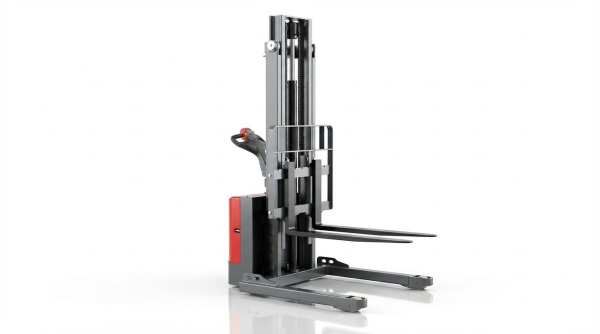
This section shows you exactly how to use a counterbalanced stacker safely before and during a shift. Focus on three things: a repeatable daily inspection, controlled testing of all motions, and disciplined load handling and positioning.
Daily safety and mechanical inspection checklist
Before you decide how to use a counterbalanced stacker on any job, you must confirm that the machine is safe. A structured checklist reduces missed items and prevents putting a faulty unit into service. If any item fails, tag the stacker “Out of Service” and report it immediately. Daily inspections are a mandatory part of safe operation.
| Area | What to Check | Pass Criteria | Action if Defect Found |
|---|---|---|---|
| Forks & load backrest | Cracks, bends, wear, distortion, loose backrest | No visible damage; backrest secure | Stop use; tag out; request repair |
| Mast, chains & hydraulics | Cracks, kinks, dry or damaged chains, oil leaks | Chains lubricated and correctly tensioned; no leaks | Tag “Out of Service”; call maintenance |
| Chassis & guards | Loose covers, damaged guards, missing fasteners | All covers tight; guards present and intact | Do not operate until fixed |
| Wheels & tires | Flat spots, chunks missing, debris jammed, excessive wear | Roll smoothly; no severe wear or damage | Remove debris; replace damaged wheels |
| Battery & cables | Charge level, corrosion, leaks, loose connectors | Charged; clean; connections tight; no leaks | Isolate unit; report leaks or damage |
| Controls & displays | Lift/lower, travel, horn, emergency stop, indicators | All respond correctly and consistently | Tag out if any control misbehaves |
| Brakes & deadman | Service brake, parking brake, handle “deadman” function | Stops straight; parking brake holds; deadman works | Remove from service; arrange repair |
| Safety labels & capacity plate | Visibility and legibility of warnings and capacity data | All labels readable; nameplate intact | Replace missing or unreadable labels |
These checks align with standard counterbalanced stacker safety guidance, including inspection of forks, hydraulics, braking, steering, and battery condition before each shift. Daily safety inspections focus on cracks, leaks, loose parts, tires, hydraulics, and batteries.
- If any leak, crack, or control fault is found, stop immediately and tag the unit “Out of Service”.
- Never “work around” a defect with reduced speed or lighter loads.
- Document inspections as part of your preventive maintenance program.
Understanding and testing travel, lift, and brake controls
Knowing how to use a counterbalanced stacker means understanding what every control does and proving it works before you enter live traffic. Perform functional tests in a clear area with no pedestrians or loads. This confirms that the truck behaves predictably in all motions. Travel and braking systems should be tested in a safe area for smooth, straight stopping.
Typical walkie stacker control functions
- Steering/tiller handle – steers and houses most controls; releasing it activates the deadman brake.
- Travel control (twist grip or rocker) – sets direction and speed for forward and reverse.
- Lift button/rocker – raises the forks and mast using the hydraulic system.
- Lower button/rocker – lowers the forks in a controlled manner.
- Horn – warns pedestrians at intersections, doors, and blind spots.
- Emergency stop – cuts power instantly in an emergency.
- Travel control test
- Select a clear, flat test area.
- With forks lowered, move slowly forward, then reverse, using minimal speed.
- Confirm smooth acceleration with no jerks or hesitation.
- Check that the truck tracks straight without pulling to one side.
- Brake and deadman test
- At low speed, release the handle and confirm the deadman brake stops the truck quickly and straight.
- Apply the service or parking brake and verify the unit holds position on level floor.
- Do not proceed if braking feels weak, uneven, or noisy.
- Lift and lower test
- Raise the empty forks through part of the stroke; listen for abnormal noises.
- Hold at mid-height and check the mast does not drift down.
- Lower the forks and confirm speed is controllable and smooth.
- Scan the mast and floor for any fresh hydraulic leaks after cycling.
These steps mirror standard operating procedures, which require testing braking, lifting, and carrying functions before starting work. Operators are expected to understand all levers, pedals, and buttons and to test them before handling loads.
Load handling, stability, and operator positioning
Safe load handling is the core of how to use a counterbalanced stacker without incidents. Stability depends on capacity, load position, fork height, speed, and where the operator stands. Poor positioning and rushed movements are common causes of tip-overs and foot injuries.
| Topic | Safe Practice | Reason |
|---|---|---|
| Load assessment | Check weight against nameplate; verify pallet condition; avoid loose or top-heavy stacks | Prevents overload and unstable centers of gravity |
| Fork spacing & entry | Set forks as wide as pallet allows; insert fully under load | Maximizes lateral stability and support |
| Travel fork height | Keep load just high enough to clear floor (a few inches) | Maintains low center of gravity and reduces tip risk |
| Speed control | Walk at a controlled pace, slower in tight aisles or with high loads | Gives time to react and reduces dynamic instability |
| Operator position | Walk beside or slightly ahead of the unit, never directly in front of forks | Protects feet and body from crush hazards |
| Visibility | Travel in reverse if the load blocks your view, using horn at intersections | Maintains line of sight to path and pedestrians |
Standard guidance states that operators must assess load weight and stability, keep forks fully inserted and spaced wide, and travel with the load low and slightly back. Loads should not exceed the rated capacity and should be transported with a low center of gravity.
- Use a smooth, uniform walking speed; avoid sudden starts, stops, or sharp turns, especially with elevated loads. Uniform speed and reduced turning speed are key to preventing tilting or falling goods.
- Keep a safe clearance from racking, walls, and fixed objects to avoid side impacts.
- Never allow anyone to ride on the forks or on the load.
- On slopes, follow manufacturer rules and keep the load on the uphill side where required for stability.
During operation, the operator should walk at the forefront of the machine, not ride it, and rely on the deadman feature to stop the truck when the handle is released. Travel speed must stay at a safe walking pace, with the horn used at intersections and reverse travel chosen when the load blocks forward vision. These positioning and speed rules are central to preventing collisions and run‑over injuries.
Workplace Setup, Batteries, And Preventive Maintenance
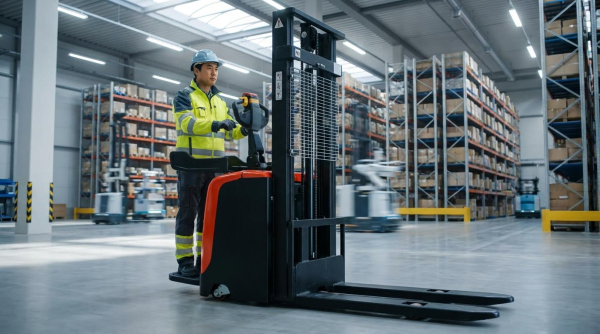
Aisle design, traffic rules, and pedestrian safety
Workplace layout is a major control on how to use a counterbalanced stacker safely and efficiently. Poor aisle design or weak traffic rules will negate even the best operator training. Use the points below as a practical design checklist.
- Aisle width and layout
- Provide enough clear width for the stacker, load, and a safety margin on both sides.
- Keep aisles straight where possible; avoid tight S-bends that force sharp steering corrections.
- Eliminate dead ends or provide turning pockets so the stacker can turn without shunting.
- Keep aisles free of debris, damaged pallets, and wrap that can catch wheels or feet and remove trip hazards promptly.
- Traffic rules for walkie stackers
- Limit travel speed to walking pace, especially in narrow aisles, near doors, and at blind corners to reduce tipping and collision risk.
- Require horn use at intersections, doorways, and when exiting racking aisles.
- Define one‑way and two‑way aisles with floor arrows and wall signs.
- Ban riding on the truck; operators must walk with the unit and use the deadman control correctly so the machine brakes when the handle is released.
- Reduce speed further when handling high or heavy loads, or when floor grip is reduced.
- Pedestrian separation and visibility
- Create marked pedestrian walkways separated from truck aisles wherever layout allows to prevent people–truck conflicts.
- Install convex mirrors at blind corners and doorways to extend sight lines.
- Require pedestrians and operators to wear high‑visibility clothing in shared areas.
- Train operators to scan ahead, make eye contact with pedestrians, and only proceed once they are clear rather than just relying on right‑of‑way rules.
- Surface and lighting conditions
- Maintain flat, solid, and clean floors; avoid wet, oily, or broken surfaces that reduce traction and can destabilize the load.
- Provide uniform lighting in aisles and inside racks so fork tips, pallet openings, and pedestrians are clearly visible to the operator.
- Mark low beams, rack bracing, and dock edges with high‑contrast paint or striping.
Why layout matters when learning how to use a walkie stacker
New operators often focus only on controls and forget that layout strongly influences risk. A well‑designed aisle and traffic plan reduces tight turns, blind conflicts, and emergency braking events, which in turn protects masts, pallets, and pedestrians. Treat aisle design and rules as part of the machine’s safety system, not just building décor.
Battery types, charging procedures, and safety
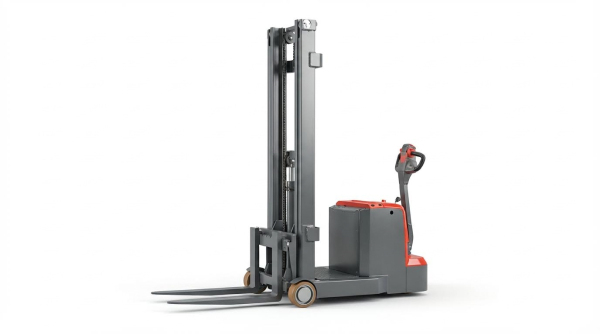
Battery care is central to how to use a walkie pallet truck safely and keep it available for work. Poor charging habits damage batteries and add avoidable fire, explosion, and acid‑burn risks.
| Aspect | Lead‑acid batteries | Typical lithium batteries |
|---|---|---|
| Common use on walkie stackers | Very common in existing fleets | Increasingly used in newer units |
| Charging area needs | Dedicated, well‑ventilated space to disperse hydrogen gas and keep away from ignition sources | Good ventilation still recommended; follow manufacturer limits on temperature and clearance |
| Main hazards | Hydrogen gas, acid splash, heavy battery handling, exposed terminals | High fault currents, thermal runaway if severely abused, electrical faults |
| Typical charging control | Dedicated industrial charger, controlled by trained personnel only in a designated zone | Matched smart charger, often with automatic shut‑off and status indication |
Use the following procedural checklist to manage battery charging and safety.
- Charging area setup
- Locate charging in a designated, ventilated area away from flammable materials and ignition sources to control fire and explosion risk.
- Provide suitable eyewash, spill kits, and acid‑neutralizing material for lead‑acid systems.
- Mark the floor and post signage restricting access to trained personnel only.
- Pre‑charge checks
- Park the walkie stacker on level ground, lower forks fully, and apply the brake.
- Turn off the truck before connecting or disconnecting the charger.
- Inspect the battery for cracks, leaks, corrosion, or damaged cables and confirm connections are secure.
- Check charge level indicators and log charging start time if your site uses records.
- Safe charging practices
- Use only the charger specified for the battery type and voltage.
- Do not smoke, weld, or create sparks near the charging area to avoid igniting hydrogen gas.
- Avoid pulling on cables; grip connectors firmly to plug or unplug.
- Keep battery tops clean and dry to prevent stray currents and tracking.
- PPE and emergency response
- Wear eye protection and appropriate gloves when working near batteries, especially when topping up or cleaning.
- If acid contacts skin or eyes, flush with water immediately and seek medical help.
- In case of electrical faults or overheating, disconnect power if safe, isolate the area, and call qualified personnel rather than attempting ad‑hoc repairs.
Battery care and everyday operation
Good battery management is part of everyday technique, not just workshop work. Operators who understand state‑of‑charge limits, avoid deep discharges, and report damage early help extend battery life and prevent sudden failures in aisles. When teaching how to use a manual pallet jack, include a short module on reading battery indicators and basic charging rules.
Planned maintenance, lubrication, and recordkeeping
Planned maintenance keeps the drum dolly predictable, which is critical for safe maneuvering in tight aisles. Unplanned failures usually show up first as weak braking, erratic lifting, or steering issues, all of which raise incident risk.
| Task group | Typical actions | Suggested frequency range |
|---|---|---|
| Daily operator checks | Visual inspection of mast, forks, wheels, hydraulic leaks, battery charge; test brakes, horn, and travel controls before use | Start of each shift |
| Lubrication and cleaning | Grease chains, bearings, and pivot points; clean mast, body, and controls to remove dust and oil following recommended intervals | Weekly to monthly, depending on duty and environment |
| Component inspections | Check fasteners, mast structure, chains, wheels, and hydraulic hoses for wear, cracks, or damage and tighten or replace as needed | Weekly to quarterly |
| Professional servicing | In‑depth checks of hydraulics, electrics, brakes, and structural parts; replacement of worn items by trained technicians | Per manufacturer hours / annual schedule |
Build your maintenance program around simple, repeatable routines that operators and technicians can follow.
- Daily and weekly operator tasks
- Inspect forks for cracks, bends, or wear and confirm the capacity label is readable so loads are kept within rating.
- Check tires and wheels for cuts, flat spots, or embedded debris that may affect stability.
- Test service brake, parking brake, steering, horn, and emergency stop for smooth, predictable operation.
- Look for hydraulic leaks around cylinders, hoses, and fittings and report any wet spots immediately.
- Lubrication and cleaning
- Lubricate chains, pivot pins, and bearings at intervals recommended in the manual to cut wear and prevent binding.
- Wipe down controls, handles, and platforms to maintain grip and prevent contamination from dust and oil.
- Remove build‑up of shrink wrap, string, or debris from axles and wheels that can increase rolling resistance.
- Recordkeeping and fault handling
- Maintain a simple equipment log for each walkie stacker recording inspections, defects, and maintenance to support preventive scheduling.
- Tag units “Out of Service” immediately when critical defects are found and prevent use until repair is complete Final Safety Considerations For Walkie Stacker Use
Safe walkie stacker use depends on how well you link machine limits, operator habits, and workplace design. The equipment’s geometry, rated capacity, and mast height set hard boundaries. Operators must respect these limits on every lift and move. Daily inspections, control tests, and clear “Out of Service” rules turn hidden defects into visible, managed risks instead of sudden failures in an aisle.
Stable loads, low travel height, and correct fork placement keep the center of gravity inside the truck’s stability triangle. Good body position and walking speed then protect feet and legs from crush points. Site rules, marked aisles, and pedestrian separation add another safety layer. They reduce sharp steering, blind conflicts, and emergency braking that push the truck toward its limits.
Battery care, charging controls, and planned maintenance keep performance predictable. That predictability is what allows operators to judge stopping distance, lift speed, and steering response correctly. For engineering and operations teams, the best practice is clear. Treat the walkie stacker, the aisle layout, the battery area, and the maintenance program as one integrated system. Train operators to follow that system every shift, and audit it regularly. This approach delivers safe, efficient handling and extends the life of your Atomoving equipment.
Frequently Asked Questions
How to Use a Walkie Stacker?
A walkie stacker is a versatile piece of material handling equipment used to lift and move pallets in warehouses. To operate it, first ensure the area is clear of obstacles. Position the forks under the pallet, adjust the height using the control handle, and move the pallet to the desired location. For lifting pallets up to 5.5 meters high with a capacity of 1500 kg, machines like the T-Series walkie reach stacker are effective solutions. Walkie Stacker Guide.
Do You Have to Be Certified to Use a Walkie Stacker?
While certification requirements vary by region, most facilities require operators to undergo training on safe operation practices. This includes understanding controls, load stability, and maneuvering techniques. Always check your local regulations or facility policies to ensure compliance. In many cases, formal certification may not be mandatory but recommended for safety.
What Should You Do Before Using a Straddle Stacker?
Before operating a straddle stacker, conduct thorough pre-operation safety checks. Inspect the equipment for damages, check fluid levels, and ensure all safety features are functioning. These steps help prevent accidents and maintain efficient operations. Straddle Stacker Safety.