Wave picking groups orders into timed “waves” so pickers, packers, and shipping all work in sync instead of reacting to random order flow. Done right, a wave picker warehouse cuts travel distance, protects carrier cutoffs, and stabilizes labor plans. This guide walks through core design principles, WMS and data requirements, and the manual pallet jack that makes waves reliable at scale. You’ll also see when wave picking beats batch and zone methods, plus how to balance KPIs, safety, and total cost of ownership before you commit.

Fundamentals Of Wave Picking Design

Core principles and workflow stages
Wave picking design starts with a clear definition of how and when orders are grouped, released, picked, and handed off to packing. A well‑designed warehouse order picker uses data, carrier cutoffs, and capacity limits to prevent congestion and missed shipments. The stages below give you a practical blueprint for engineering the end‑to‑end flow.
- Core design principles
- Group orders into waves by time window, carrier, service level, or product family to align picking with shipping and labor plans. Waves are typically scheduled around carrier pickups and workload balancing.
- Minimize picker travel by clustering orders with overlapping locations and using aisle‑minimization logic. Advanced algorithms can cut aisle visits by 15–60%.
- Balance wave size against downstream sortation and packing capacity to avoid bottlenecks. Oversized batches often overwhelm pack stations.
- Use the WMS as the single control layer for wave creation, release timing, picker routing, and status tracking. Mobile scanners and real‑time inventory are standard enablers.
- Design rules for special SKUs (hazardous, temperature‑controlled, fragile) so they are segregated or handled in dedicated waves. Ignoring these constraints is a common configuration mistake.
Typical workflow stages in a wave picker warehouse
The stages below show how orders flow from receipt to shipment in a wave‑based design.
- Pre‑wave planning
- Analyze open orders, carrier cutoffs, labor availability, and equipment capacity for the shift.
- Define wave templates for different profiles (e.g., single‑line e‑commerce, multi‑line wholesale, priority orders).
- Set volume and SKU constraints per wave to match packing and shipping capacity. Historical throughput is the main input for this sizing.
- Wave grouping (pre‑wave)
- WMS groups orders into waves using criteria such as location, due date, carrier, and SKU class. Orders are batched before pickers start work.
- Single‑line orders can be grouped into dedicated waves to avoid downstream consolidation. These waves feed pack directly with minimal sorting.
- Wave release and execution
- Waves are released at defined times, usually tied to carrier pickups or internal truck departures. Typical practice is to launch a wave before each carrier cutoff.
- Pickers receive work on RF scanners, following optimized paths and S‑shaped routing to minimize aisle traversals. Aisle‑minimization algorithms reduce travel by up to ~47% per task.
- Scanners track each pick, update inventory, and keep orders separated by container or position.
- Post‑wave consolidation and packing
- Totes or cartons from the wave arrive at sortation or pack stations.
- Operators or automation consolidate line items to orders, verify, and pack. Scanners support separation and final checks.
- Exceptions (shorts, damages, substitutions) are handled before the wave is closed in the WMS.
- Wave close‑out and feedback
- WMS records actual times, productivity, and error rates for the wave.
- Data feeds back into future wave sizing, slotting, and labor planning.
When these stages are engineered and controlled, a semi electric order picker warehouse can cut travel, protect carrier cutoffs, and increase lines picked per labor hour without sacrificing accuracy.
Fixed vs dynamic waves and control rules
Wave design choices are mainly about stability versus flexibility. Fixed waves give repeatable schedules that are easy to run; dynamic waves react to live demand and capacity. Most high‑volume operations blend both, using control rules in the WMS to decide which approach applies to each order set.
| Aspect | Fixed waves | Dynamic waves |
|---|---|---|
| Release timing | Pre‑set times (e.g., 09:00, 12:00, 15:00) aligned with carrier cutoffs | Continuous or event‑driven based on order intake, priority, or capacity |
| Planning effort | Higher upfront design, lower day‑to‑day decision load | Requires active monitoring and automated decision logic |
| Responsiveness | Limited once waves are scheduled and released | High; can absorb spikes or rush orders in near real time |
| Best for | Predictable profiles and stable carrier schedules | Volatile order patterns, frequent same‑day or priority orders |
| Typical risk | Idle time between waves, stranded late orders | Over‑frequent small waves, higher coordination complexity |
In fixed‑wave environments, releases are often tied to outbound schedules. For example, a facility may launch a wave dedicated to a specific carrier shortly before its pickup to ensure all orders make the truck. This pattern is common where carrier cutoffs are strict and predictable. Dynamic waves instead use real‑time rules that watch backlogs, picker availability, and service levels, then assemble and release waves when thresholds are hit. They are widely used to manage unexpected order spikes or last‑minute priority orders.
- Key control rules to define in the WMS
- Wave eligibility: which orders can be waved together (same carrier, ship date, temperature class, or zone).
- Capacity caps: maximum lines, units, cartons, or total cube per wave to protect pack and dock capacity. Right‑sizing avoids downstream bottlenecks.
- Priority logic: how rush, back‑ordered, or aging orders are pulled into earlier waves.
- Cutoff protection: rules that force release of remaining eligible orders before each carrier departure.
- Exception handling: what happens to shorts, substitutions, or held orders when a wave closes.
When to favor fixed vs dynamic waves
Use this as a quick engineering guide when choosing a control strategy for a wave picker warehouse.
- Favor fixed waves when
- Carrier schedules are stable and dominate your service promises.
- Order volume is high but pattern is predictable by time of day.
- Labor is organized in fixed shifts with limited cross‑training.
- IT tools are basic and you want simple, repeatable routines.
- Favor dynamic waves when
- Same‑day or cut‑off‑driven orders are a large share of volume.
- Demand spikes by channel or region are common and hard to forecast.
- You have a capable WMS and reliable real‑time data.
- Supervisors can manage live dashboards instead of static plans. Dynamic waves help reduce manual rescheduling effort.
Integrating wave logic into WMS
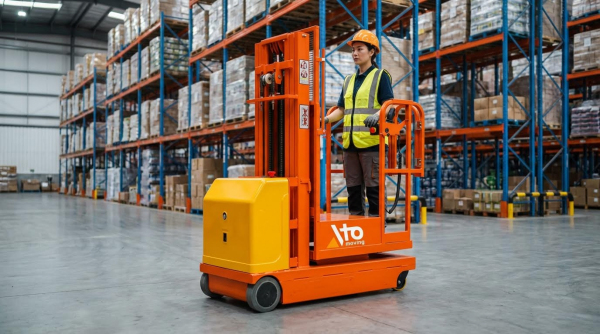
Wave picking only scales when the WMS holds the logic instead of spreadsheets or manual boards. Integration means configuring data models, rule sets, and device workflows so every picker and station operates off the same source of truth. This is where a order picking machines warehouse gains most of its safety, accuracy, and throughput benefits.
- Core WMS functions for wave picking
- Order pre‑processing: classify orders by channel, service level, carrier, and SKU attributes before wave assignment. Pre‑wave grouping is typically automated.
- Wave building engine: applies eligibility rules, capacity caps, and aisle‑minimization logic to form optimal waves. Algorithms group orders to minimize aisle visits and respect cart capacity.
- Scheduling and release: supports both time‑based (fixed) and event‑driven (dynamic) releases, with dashboards for supervisors.
- Task generation: converts waves into pick tasks, assigns them to users or devices, and sequences locations to shorten paths. Pickers typically follow WMS‑guided routes via mobile scanners.
- Execution tracking: monitors progress, exceptions, and completion times at wave and task level.
| Integration element | What to configure | Impact on performance |
|---|---|---|
| Order attributes | Carrier, service level, ship date, temperature class, hazard flags | Enables safe and logical grouping of orders into waves |
| Location and slotting data | Pick faces, zones, velocity codes, congestion constraints | Feeds aisle‑minimization and zone‑based wave templates |
| Capacity parameters | Lines/hour per picker, pack‑station throughput, cart capacity | Prevents oversized waves and downstream bottlenecks |
| Device interfaces | RF scanners, pick‑to‑light, AS/RS and conveyor controls | Delivers real‑time instructions and inventory updates |
| Analytics layer | Wave cycle time, picks/hour, errors per thousand lines | Supports continuous tuning of wave rules and labor plans |
To fully leverage automation, the WMS must also integrate with material handling systems such as AS/RS and sorters. Real‑time inventory from automated systems allows tighter wave planning and faster consolidation. In high‑throughput environments, pick‑to‑light or goods‑to‑person stations can be driven directly from wave tasks, increasing productivity by 30–50% when correctly applied. Light‑directed and automated systems are standard in dense pick modules.
Practical integration tips for engineers
Use these checkpoints when designing or upgrading WMS integration for wave picking.
- Model carrier cutoffs and internal truck departures as explicit time objects in the WMS, not just notes.
- Keep wave rule sets version‑controlled so you can A/B test different batching and routing strategies.
- Start with conservative capacity caps and increase only after you have stable KPI data.
- Instrument the process: track dwell time at each stage (pre‑wave, pick, pack, load) and feed it back into rules.
- Design exception flows (shorts, re‑picks, damages) as separate micro‑waves to keep the main flow clean.
When Wave Picking Works Best And How To Select It

Operational profiles suited to wave picking
Wave picking fits best where you can plan work against clear time windows and repeatable demand. The goal is to let a wave picker warehouse hit carrier cutoffs while keeping travel and congestion under control. You select it when order volume, SKU mix, and shipping promises all benefit from grouping orders into time‑bound waves. Waves are typically released against shipping schedules, carriers, or product groups.
Typical operational profiles where wave picking is strong:
- High daily order volume with many small to medium orders that share carriers or ship windows.
- Strict carrier cutoffs (parcel, LTL, line‑haul) where you can build waves backward from pickup times. Example: releasing a carrier‑specific wave before noon pickup.
- Medium–large facilities where picker travel is a significant cost and you can reduce passes through aisles by grouping work. Wave optimization can cut aisle visits by double‑digit percentages.
- Stable or repeatable demand patterns that allow pre‑planned wave templates by carrier, region, or order type.
- Multi‑stage operations (pick → sort → pack → load) where you can synchronize waves with pack and dock capacity.
- Significant single‑line orders that can be grouped into dedicated waves for fast pass‑through to packing, avoiding consolidation. Single‑line waves can go straight from pick to pack.
- Automation present (AS/RS, mobile robots, conveyors) where waves help balance machine and human workloads.
Profiles where wave picking is usually a poor fit
Wave picking is less suitable when orders must start immediately, such as emergency spares, on‑demand fulfillment, or very low volume environments. It also struggles in tiny warehouses where walking distances are short and batching overhead adds more complexity than benefit. Highly volatile, same‑day e‑commerce with unpredictable spikes may need hybrid or dynamic waves instead of rigid, fixed schedules.
Comparing wave, batch, and zone picking strategies

Wave, batch, and zone picking solve different problems. A mature wave picker warehouse often blends them, but you should understand the core trade‑offs first.
| Criterion | Wave picking | Batch picking | Zone picking |
|---|---|---|---|
| Basic concept | Group orders into time‑bound waves by rules (carrier, cutoff, SKU group, priority). | Picker collects items for multiple orders in one trip, then sorts. Batch picking reduces trips in smaller or lower‑volume environments. | Warehouse split into zones; each picker or system works only their zone. Zone picking minimizes cross‑aisle movement. |
| Best facility size | Medium to very large, multi‑aisle layouts. | Small to medium facilities where travel distance is moderate. | Large, complex layouts with many aisles or mezzanines. |
| Order volume pattern | High volume with peaks tied to shipping cutoffs. | Low–medium volume, steady flow. | Medium–high volume, especially with wide SKU range. |
| Control focus | Time and dock capacity; meeting carrier windows. | Picker walking distance and touches. | Aisle congestion and labor balancing across zones. |
| Routing efficiency | High when combined with aisle‑minimization algorithms. Algorithms can reduce aisle visits by 15–60% using S‑shape routing. | High within each batch, but less control over ship windows. | Good inside zones; cross‑zone routing handled by conveyor or tote flow. |
| WMS complexity | High: requires wave rules, cutoffs, capacity constraints, and monitoring. | Medium: batching logic and post‑pick sortation. | Medium–high: zone definitions, inter‑zone handoff logic. |
| Labor skill needs | Higher for planners; pickers follow system prompts. | Moderate; pickers manage multi‑order carts or totes. | Moderate; pickers specialize in a zone’s SKU mix. |
| Responsiveness to rush orders | Good with dynamic waves; weaker with fixed waves. Dynamic waves adjust to live priorities. | Moderate; urgent orders may need separate single‑order picks. | Moderate; rush orders must traverse multiple zones. |
| Typical add‑ons | Slotting optimization, AS/RS, mobile robots, conveyors, sortation. | Cart design, pick‑to‑cart logic, simple conveyors. | Pick‑to‑light, zone‑based conveyors, put walls. |
Selection guidelines:
- Use wave picking when your main constraint is time and dock cutoffs, not just walking distance.
- Use batch picking in smaller sites where travel dominates cost and ship windows are forgiving.
- Use zone picking when the warehouse footprint and SKU range cause congestion and long cross‑aisle moves.
- Combine strategies: for example, wave‑released zone picking or wave‑driven batch carts in a wave picker warehouse.
KPIs, TCO, and safety considerations

Wave picking only pays off if you track the right KPIs and include system and safety impacts in total cost of ownership (TCO). The aim is to convert routing and scheduling improvements into measurable throughput and labor savings without increasing risk.
| Area | Key KPIs for wave picking | TCO / cost levers | Safety & ergonomics focus |
|---|---|---|---|
| Throughput & service | – Orders shipped on time per wave – % waves meeting carrier cutoff – Lines picked per labor hour – Dock utilization vs plan | – Avoided carrier re‑booking and expedites – Better trailer cube utilization through timed waves – Reduced overtime at end of shift | – Controlled dock loading sequence reduces rush and short‑cuts – Clear staging lanes per wave lower trip and collision risk |
| Travel & handling | – Average travel distance per pick task – Aisle visits per wave – Touches per order | – Less MHE hours (tugs, pallet jacks) – Lower maintenance from fewer travel miles – Smaller fleet size where waves smooth peaks | – Fewer long pushes of heavy carts – Less congestion lowers impact and pinch hazards |
| Planning & system load | – Wave planning time per shift – Wave re‑plan rate (changes after release) – WMS job queue latency | – WMS licensing and tuning – Planner headcount and training – Integration work with automation | – Stable plans reduce last‑minute manual overrides and confusion on floor |
| Quality & rework | – Picking accuracy by wave – Short shipments per 1,000 lines – Re‑picks and re‑packs | – Reduced credits/returns – Less rework labor and re‑handling damage | – Clear wave labeling and scanner workflows reduce mis‑sort and re‑handling |
To evaluate TCO when moving to a wave picker warehouse, consider both investments and savings:
- Investments
- WMS wave module configuration and integration.
- Additional devices (scanners, terminals) for tighter control. Wave execution depends on real‑time data capture.
- Engineering time for slotting and aisle‑minimization algorithms. Slotting based on 52‑week movement data supports efficient waves.
- Training supervisors and planners on wave rules and exception handling.
- Savings and benefits
- Higher lines per hour from reduced travel and better routing.
- Fewer missed cutoffs and lower premium freight costs. Wave picking helps ensure punctual shipments.
- Better use of pack stations and docks by smoothing flow across the day.
- Possibility to defer capital for extra docks or MHE by improving utilization.
Safety must be designed into the wave plan, not checked afterward:
- Traffic management: avoid releasing overlapping waves that overload the same aisles; use algorithms to distribute high‑velocity SKUs and paths to reduce congestion. Distributing high movers across aisles can cut congestion significantly.
- Load ergonomics: limit cart and pallet weight per wave; ensure high‑frequency picks are at ergonomic heights through slotting.
- Clarity of signals: scanners, pick‑to‑light, or displays must clearly show wave, order, and location to prevent mis‑picks and sudden stops. Pick‑to‑light can raise productivity and accuracy in high‑throughput zones.
- Shift design: align wave timing with breaks and shift changes so you do not rush end‑of‑wave tasks under fatigue.
Quick checklist: Is wave picking right for your site?
Answer “yes” to most of these and wave picking is a strong candidate:
- You have defined carrier cutoffs and want better control of on‑time departures.
- Travel distance per order is high enough that routing gains matter.
- Your WMS can support wave rules and real‑time tasking.
- You can dedicate at least one planner or supervisor to wave scheduling.
- Pack and dock capacity can be modeled and used as constraints.
- You are ready to invest in slotting and data analysis to feed better waves.
Final Thoughts On Implementing Wave Picking
Wave picking works when engineering, systems, and equipment all point at the same goal: ship on time with less travel and chaos. The process design defines how orders group, when they release, and how they flow through pick, pack, and load. Fixed and dynamic waves then give you the levers to trade stability against responsiveness, as long as you hold strict rules for eligibility, capacity, and cutoffs.
The WMS is the real control layer. It must own wave building, routing, device tasks, and feedback loops. When you feed it clean slotting data, realistic capacity limits, and live scanner feedback, it can cut aisle visits, smooth dock use, and keep hazardous or fragile SKUs safe by design. Material handling choices, from carts to order pickers sourced from Atomoving, only reach full value when they run under that disciplined logic.
For operations and engineering teams, the verdict is clear. Do not “try” wave picking as a tweak. Treat it as a full system design. Start with carrier cutoffs and safety rules, size conservative waves, and tune using KPIs on travel, accuracy, and TCO. When those numbers stabilize, you can scale waves, add automation, and lock in a safer, faster warehouse.
Frequently Asked Questions
What is wave picking in a warehouse?
Wave picking is a warehouse order-picking strategy where tasks are grouped into waves based on specific criteria, such as delivery deadlines or product categories. This method helps improve efficiency by organizing work into manageable time slots. For example, all orders needed for morning deliveries might be picked during one wave. It reduces congestion and optimizes the use of labor and equipment. Learn more about warehouse picking strategies.
What are the duties of a warehouse picker?
A warehouse picker’s main responsibility is to locate and collect items from shelves to fulfill customer orders. Other key duties include:
- Operating material handling equipment like forklifts or pallet jacks safely.
- Moving efficiently through the warehouse to minimize picking time.
- Lifting and carrying items, which can sometimes be physically demanding.
- Ensuring accuracy in picking to avoid errors in orders.
This role requires focus and physical stamina due to the fast-paced environment. For additional insights, check out this guide on warehouse picking.
Is picking in a warehouse hard?
Yes, picking in a warehouse can be challenging due to several factors:
- The job often involves repetitive lifting and walking long distances.
- Pickers face pressure to meet tight deadlines while maintaining accuracy.
- Managing stress in a high-demand environment is a common challenge.
Despite these challenges, many find it rewarding as it offers opportunities for career growth. For tips on managing these challenges, refer to this best practices guide.